Features

Features for simple manual budgeting.

AI Fund brings the everyday budgeting loop into one calm mobile experience: set a budget, enter expenses, compare spending against limits, and keep your transaction history useful.

Access

Sign in or explore demo mode

  • Continue with Apple or Google.
  • Try demo mode with seeded non-sensitive budgeting data.
  • Keep demo data separate from real user accounts.
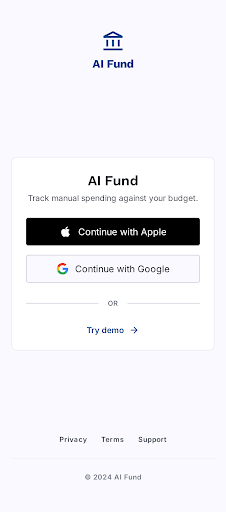
AI Fund sign in mobile mockup from the refined Stitch design
Sign in or explore demo mode

Onboarding

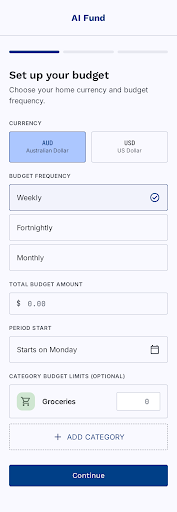
A budget setup made for one person

  • Choose AUD or USD as the home currency.
  • Select weekly, fortnightly, or monthly periods.
  • Set total budget and optional category limits.
AI Fund budget setup mobile mockup from the refined Stitch design
A budget setup made for one person

Overview

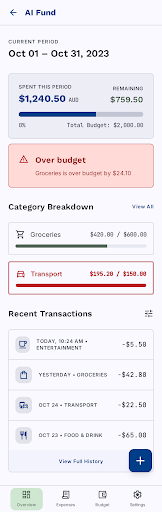
Current-period spending at a glance

  • Show spent this period and remaining budget.
  • Track category progress and recent transactions.
  • Spot over-budget categories without digging through a spreadsheet.
AI Fund overview mobile mockup from the refined Stitch design
Current-period spending at a glance

Expenses

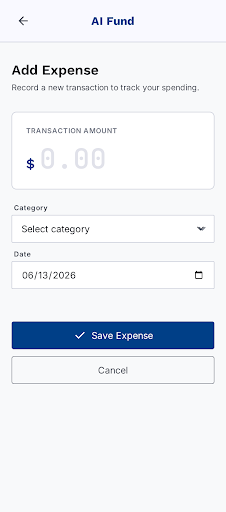
Manual expense entry

  • Add amount, category, and date.
  • Support today, past dates, and future dates up to 30 days ahead.
  • Keep the form focused on the fields that matter for budget tracking.
AI Fund add expense mobile mockup from the refined Stitch design
Manual expense entry

History

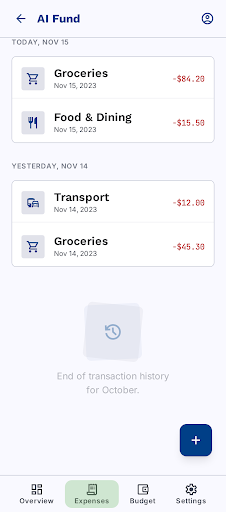
Simple expense review

  • Review manually entered expenses by date.
  • Edit or delete expense records.
  • Use the home currency selected during onboarding.
AI Fund expenses list mobile mockup from the refined Stitch design
Simple expense review

Budget

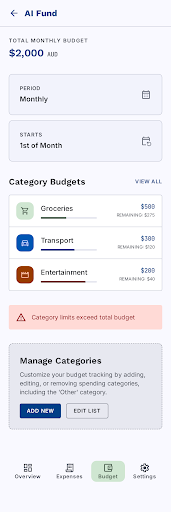
Totals, categories, and limits

  • Edit total budget limit and period rules.
  • Manage default and custom categories.
  • Warn when category budgets exceed the total budget.
AI Fund budget settings mobile mockup from the refined Stitch design
Totals, categories, and limits

Settings

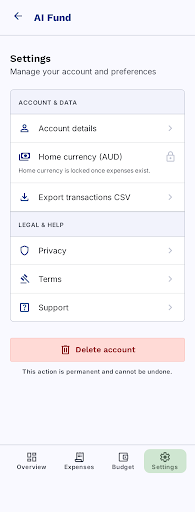
Export, links, and account deletion

  • Export all transactions to CSV through the native share sheet.
  • Show privacy, terms, and support links.
  • Delete profile, budgets, categories, expenses, and auth account.
AI Fund settings mobile mockup from the refined Stitch design
Export, links, and account deletion

States

Support states for real use

  • Handle no-expense, network, save failed, and export failed states.
  • Confirm destructive actions like expense deletion and account deletion.
  • Keep demo reset and category reassignment paths explicit.
AI Fund support states mobile mockup from the refined Stitch design
Support states for real use

Product fit

Designed for people who want to budget deliberately.

  • Manual entry helps you stay close to everyday spending.
  • No bank connection is needed to build a useful budget.
  • Neutral summaries show what happened without financial advice.
  • AUD and USD support keep the first setup simple.
  • CSV export gives you a portable record of every transaction.